
GRPO Training with GSM8K & Geo3K Datasets
This tutorial walks you through using LightRFT to run GRPO (Group Relative Policy Optimization) training on two math reasoning datasets: GSM8K (text-only) and Geo3K (multi-modal with geometry diagrams).
Overview
Item |
GSM8K |
Geo3K |
|---|---|---|
Task |
Grade-school math word problems |
Geometry problem solving |
Modality |
Text-only |
Multi-modal (text + image) |
Source |
||
Train / Test |
7,473 / 1,319 |
~2,100 / 601 |
Reward |
Pure rule-based (no neural reward model) |
Pure rule-based (no neural reward model) |
Base Model |
Qwen2.5-0.5B-Instruct (or larger) |
Qwen2.5-VL-7B-Instruct |
Both tasks use a pure rule-based reward mechanism:
Format reward (10%): Checks for
<think>...</think>reasoning tags followed by\boxed{}answer notation.Accuracy reward (90%): Verifies the final answer against the ground truth using mathruler.
No separate neural reward model is required.
1. Dataset Preprocessing
Before training, convert the raw HuggingFace datasets into LightRFT-compatible parquet format.
1.1 GSM8K Preprocessing
python examples/gsm8k_geo3k/data_preprocess/gsm8k.py \
    --local_save_dir ~/data/gsm8k
The script performs the following steps:
Loads
openai/gsm8kfrom HuggingFace (or a local path via--local_dataset_path).Extracts the numerical answer from the
#### ANSWERpattern in each solution (commas are stripped, e.g.1,000→1000).Wraps each question into a chat-structured prompt:
{
  "prompt": [
    {"role": "system", "content": "You FIRST think about the reasoning process step by step ... The final answer MUST BE put in \\boxed{} after the reasoning."},
    {"role": "user", "content": "<original question>"}
  ],
  "extra_info": {
    "label": "gsm8k_rule",
    "reference": "<extracted numerical answer>"
  }
}
Saves
train.parquetandtest.parquetto the specified directory.
1.2 Geo3K Preprocessing
python examples/gsm8k_geo3k/data_preprocess/geo3k.py \
    --local_save_dir ~/data/geo3k
The script performs the following steps:
Loads
hiyouga/geometry3kfrom HuggingFace (or a local path via--local_dataset_path).Preserves the geometry diagram images from the dataset.
Wraps each problem into a chat-structured prompt with image references:
{
  "prompt": [
    {"role": "system", "content": "You FIRST think about the reasoning process ... The final answer MUST BE put in \\boxed{}."},
    {"role": "user", "content": "<geometry problem text>"}
  ],
  "images": ["<PIL Image>"],
  "extra_info": {
    "label": "geo3k_rule",
    "reference": "<ground truth answer>"
  }
}
Saves
train.parquetandtest.parquetto the specified directory.
1.3 Output Format Summary
Both preprocessing scripts produce a unified schema:
Field |
Description |
|---|---|
|
Chat-structured list |
|
List of PIL images (Geo3K only; absent for GSM8K) |
|
|
|
Ground truth answer string for rule-based evaluation |
2. Training
2.1 GSM8K — Text-Only GRPO Training
# Edit paths in the script first, then:
bash examples/gsm8k_geo3k/run_grpo_gsm8k_qwen2.5_0.5b.sh
Or launch directly with torchrun:
torchrun --nnodes 1 --nproc-per-node 8 \
    examples/gsm8k_geo3k/train_colocate.py \
    --pretrain Qwen/Qwen2.5-0.5B-Instruct \
    --prompt_data /path/to/gsm8k_dataset \
    --input_key prompt --label_key label \
    --text_only \
    --loss_agg_mode seq-mean-token-mean \
    --advantage_estimator group_norm \
    --n_samples_per_prompt 5 \
    --num_episodes 30 \
    --max_epochs 1 \
    --train_batch_size 128 \
    --rollout_batch_size 128 \
    --micro_train_batch_size 4 \
    --micro_rollout_batch_size 4 \
    --actor_learning_rate 1e-6 \
    --lr_warmup_ratio 0.03 \
    --init_kl_coef 0.01 \
    --kl_estimator k3 \
    --use_kl_loss \
    --l2 1.0e-2 \
    --fsdp --zero_stage 3 --bf16 \
    --flash_attn --gradient_checkpointing \
    --apply_chat_template \
    --freeze_prefix \
    --adam_offload \
    --rm_use_engine \
    --reward_pretrain "{}" \
    --engine_type sglang --engine_tp_size 2 \
    --engine_mem_util 0.6 --enable_engine_sleep \
    --eval_steps 20 --eval_split test \
    --max_eval_samples 1319 \
    --save_path results/gsm8k_grpo \
    --save_steps 20 --max_ckpt_num 3 \
    --system_prompt 'A conversation between the User and Assistant. The User asks a question, and the Assistant provides a solution. The Assistant first thinks through the reasoning process internally with self-reflection and consistency check and then gives the final analysis and answer. The reasoning process should be enclosed within <think></think>, followed directly by the final thought and answer, the final answer MUST BE put in \\boxed{}, like this: <think> reasoning process here </think> final thought and \\boxed{answer} here.'
2.2 Geo3K — Multi-Modal GRPO Training
# Edit paths in the script first, then:
bash examples/gsm8k_geo3k/run_grpo_geo3k_qwen2.5_vl_7b.sh
Or launch directly with torchrun:
torchrun --nnodes 1 --nproc-per-node 8 \
    examples/gsm8k_geo3k/train_colocate.py \
    --pretrain Qwen/Qwen2.5-VL-7B-Instruct \
    --prompt_data /path/to/geo3k_dataset \
    --input_key prompt --label_key label \
    --mixed_mm_data \
    --images_key images \
    --loss_agg_mode seq-mean-token-mean \
    --advantage_estimator group_norm \
    --n_samples_per_prompt 8 \
    --num_episodes 20 \
    --max_epochs 1 \
    --train_batch_size 128 \
    --rollout_batch_size 128 \
    --micro_train_batch_size 4 \
    --micro_rollout_batch_size 8 \
    --actor_learning_rate 1e-6 \
    --lr_warmup_ratio 0.03 \
    --init_kl_coef 0.01 \
    --kl_estimator k3 \
    --use_kl_loss \
    --l2 1.0e-2 \
    --fsdp --zero_stage 3 --bf16 \
    --flash_attn --gradient_checkpointing \
    --apply_chat_template \
    --freeze_prefix \
    --adam_offload \
    --rm_use_engine \
    --reward_pretrain "{}" \
    --engine_type sglang --engine_tp_size 2 \
    --engine_mem_util 0.6 --enable_engine_sleep \
    --limit_mm_image_per_prompt 10 \
    --eval_steps 20 --eval_split test \
    --max_eval_samples 700 \
    --save_path results/geo3k_grpo \
    --save_steps 20 --max_ckpt_num 2 \
    --system_prompt 'A conversation between the User and Assistant. The User asks a question, and the Assistant provides a solution. The Assistant first thinks through the reasoning process internally with self-reflection and consistency check and then gives the final analysis and answer. The reasoning process should be enclosed within <think></think>, followed directly by the final thought and answer, the final answer MUST BE put in \\boxed{}, like this: <think> reasoning process here </think> final thought and \\boxed{answer} here.'
2.3 Geo3K — LoRA GRPO Training (Parameter-Efficient)
For resource-constrained environments, use LoRA to fine-tune only a small fraction of parameters:
bash examples/gsm8k_geo3k/run_grpo_geo3k_lora_qwen2.5_vl_7b.sh
Key LoRA-specific parameters:
--lora_rank 128 \
--lora_alpha 256 \
--target_modules all-linear
3. Key Hyperparameters
Parameter |
GSM8K Default |
Geo3K Default |
Description |
|---|---|---|---|
|
5 |
8 |
Number of rollout samples per prompt (GRPO group size) |
|
30 |
20 |
Total training episodes |
|
128 |
128 |
Global training batch size |
|
128 |
128 |
Global rollout batch size |
|
4 |
4 |
Per-GPU micro training batch size |
|
4 |
8 |
Per-GPU micro rollout batch size |
|
1e-6 |
1e-6 |
Actor learning rate |
|
0.03 |
0.03 |
Learning rate warmup ratio |
|
0.01 |
0.01 |
KL divergence penalty coefficient |
|
k3 |
k3 |
KL estimator type |
|
1024 |
1024 |
Maximum prompt length |
|
2048 |
2048 |
Maximum generation length |
|
group_norm |
group_norm |
GRPO advantage estimation |
|
2 |
2 |
Inference engine tensor parallelism |
|
1e-2 |
1e-2 |
L2 regularization weight |
|
Yes |
No |
Text-only mode (no image processing) |
|
No |
Yes |
Enable multi-modal data processing |
4. Reward Mechanism
4.1 RECIPE Configuration
The reward system is driven by a label-based RECIPE mapping defined in examples/gsm8k_geo3k/reward_models_utils.py:
RECIPE = {
    "geo3k_rule": [("geo3k_rule", None, 1.0)],
    "gsm8k_rule": [("gsm8k_rule", None, 1.0)],
}
Each sample’s label field (set during preprocessing) determines which reward function is applied.
4.2 Format Reward (10% weight)
Validates the model output follows the required reasoning format:
<think> reasoning process here </think> final thought and \boxed{answer}
The check uses regex to verify:
<think>...</think>tags are present.\boxed{...}notation is present.The
</think>closing tag appears before\boxed{}.
def format_reward_fn(sol: str) -> float:
    think_match = re.search(r'<think>.*?</think>', sol, re.DOTALL)
    boxed_match = re.search(r'\\boxed\{.*?\}', sol, re.DOTALL)
    if think_match and boxed_match:
        return 1.0 if think_match.end() <= boxed_match.start() else 0.0
    return 0.0
4.3 Accuracy Reward (90% weight)
Extracts the answer from \boxed{} and compares it against the ground truth:
def accuracy_reward_fn(sol: str, gt: str) -> float:
    from mathruler.grader import extract_boxed_content, grade_answer
    pred = extract_boxed_content(sol)
    return 1.0 if grade_answer(pred, gt) else 0.0
mathruler.grader handles numeric equivalence, fraction simplification, and other mathematical normalization.
4.4 Combined Reward
final_reward = 0.9 * accuracy_reward + 0.1 * format_reward
4.5 Response Extraction
Before reward computation, the assistant’s response is extracted from the full chat transcript to avoid false positives from system prompt examples:
def extract_response(text: str) -> str:
    # Finds the last <|im_start|>assistant ... <|im_end|> segment
    ...
5. Training Monitoring (W&B)
5.1 Enable W&B Logging
Set the following in your training script:
export WANDB_API_KEY="your_api_key"
export WANDB_PROJECT="LightRFT-Experiments"
export WANDB_MODE="online"  # "offline" for local-only logging
5.2 Key Metrics
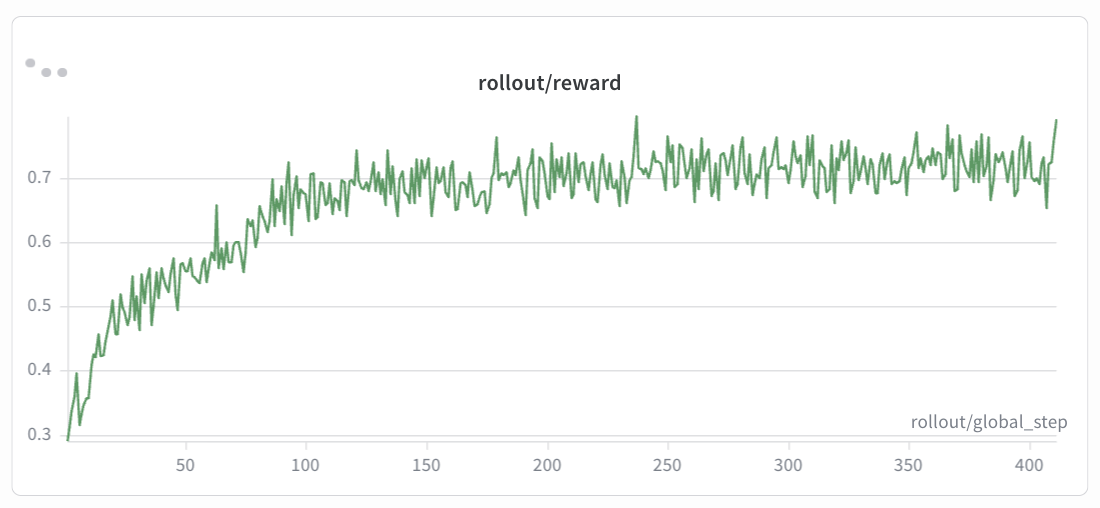
rollout/reward
GSM8K (Qwen2.5-0.5B-Instruct):
Geo3K (Qwen2.5-VL-7B-Instruct):
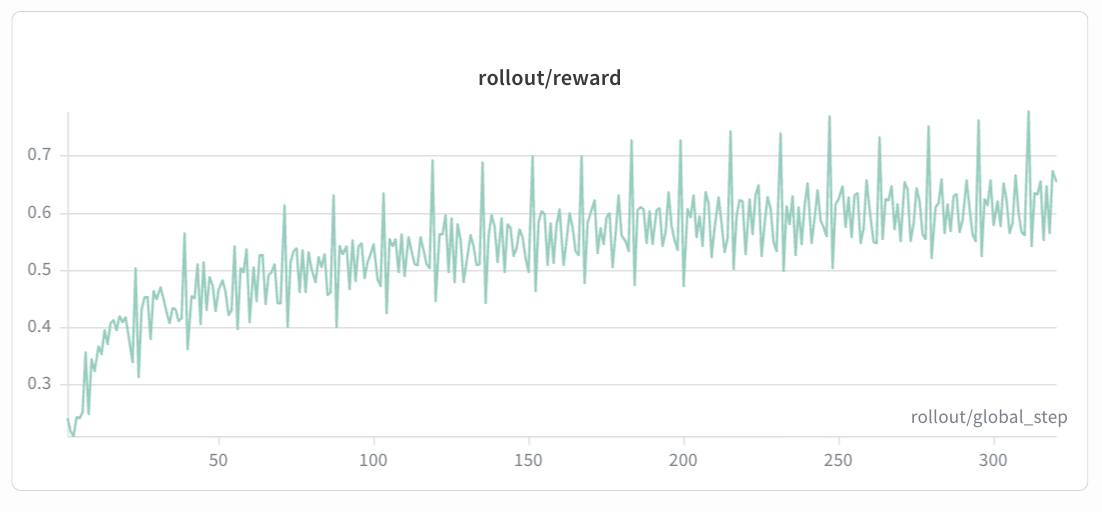
Expected trend: The rollout/reward curve should show a steady upward trend over training steps. In early episodes, the reward typically starts low as the model has not yet learned the correct format and reasoning patterns. As training progresses, the reward should increase smoothly and monotonically with minor fluctuations, eventually converging to a stable level. If the reward plateaus early or drops sharply, consider adjusting the KL coefficient or learning rate.
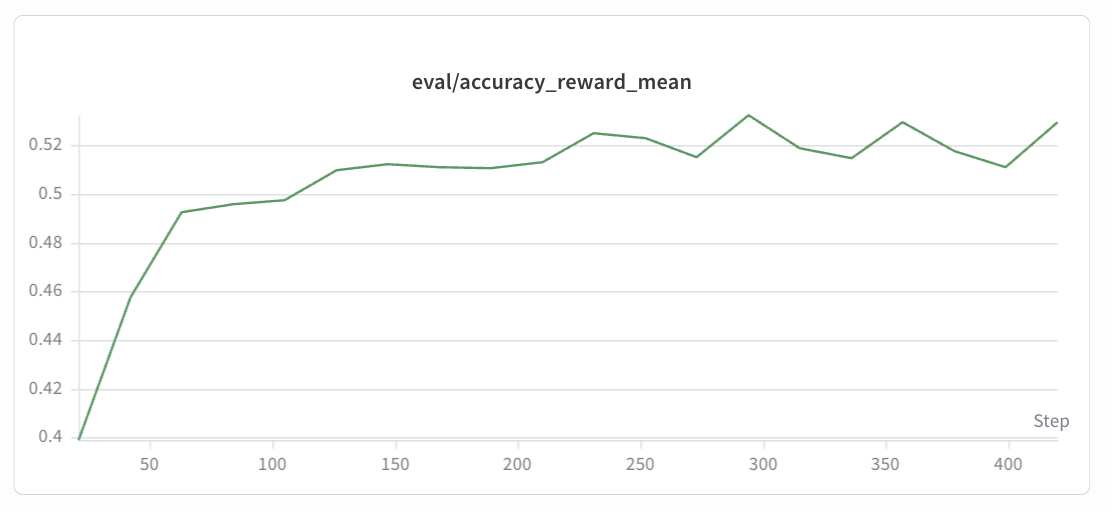
eval/accuracy
GSM8K (Qwen2.5-0.5B-Instruct):
Geo3K (Qwen2.5-VL-7B-Instruct):
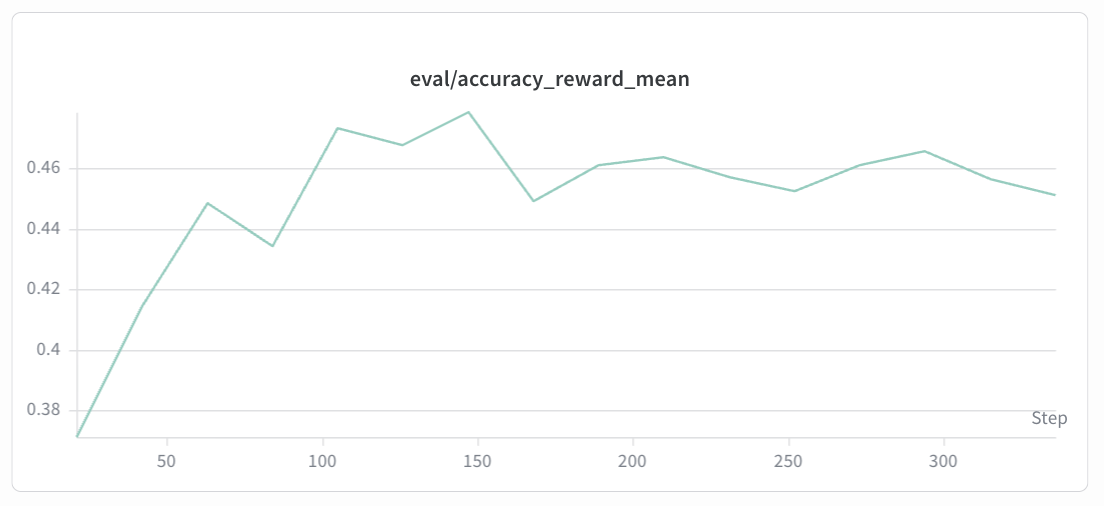
Expected trend: The eval/accuracy curve reflects the model’s actual problem-solving ability on the held-out test set. It should correlate with the reward curve but may lag slightly. Accuracy is expected to gradually improve from the base model’s initial level, showing an overall upward trend before eventually converging. The eval curve is noisier than the reward curve due to smaller evaluation sample sizes. Sudden drops may indicate overfitting or KL divergence issues — consider adjusting the KL coefficient or learning rate accordingly.
5.3 Additional Useful Metrics
Metric |
Description |
|---|---|
|
Format compliance rate |
|
Answer correctness rate |
|
Actor policy loss (should decrease) |
|
KL divergence from reference policy (should stay bounded) |
|
Policy entropy (gradual decrease indicates learning) |
6. Tips & Troubleshooting
OOM: Reduce
micro_train_batch_size/micro_rollout_batch_size, or lower--engine_mem_util.Slow convergence: Increase
--n_samples_per_promptfor better GRPO advantage estimation.Format reward stuck at 0: Verify the system prompt is correctly passed via
--system_promptand--apply_chat_template.Geo3K image loading errors: Ensure the preprocessed parquet files contain valid PIL image objects and
--images_key imagesis set.LoRA training: Use
--lora_rank 128 --lora_alpha 256for a good balance between efficiency and capacity.